

From PDF drawing to signed report. Your whole dimensional inspection, end to end.
Report automates drawing ballooning and tolerance calculation. Your machinists enter their measurements on the shop floor, your quality manager signs off, and the report is ready to ship. No re-keying.
Real production KPIs, September 2026
An inspection report is not a ballooned drawing.
It is six steps, three or four people, and a file that changes hands at every step. Ballooning the drawing is step two. Report does all six.
- 1. The orderat the office
- 2. Ballooningat the office
- 3. TolerancesReport calculates them
- 4. Measurementsat the machine, by the machinist
- 5. Sign-offthe quality manager
- 6. The delivered reportat your customer's
I built these reports for years: balloons in Acrobat, the grid in Excel, the sheet at the machine, retyping into Excel, then cleaning it all up. Five hand-offs, five chances to slip a line. In Report, the data goes in once and follows through to the signed report.
- 3 minto build a report under 20 dimensions, the everyday drawing
- 11.2 minfor a real 192-dimension drawing, that is 3.5 s per dimension
- Experienced user
- Other users
Report's own timer, from opening the wizard to saving: it keeps running even when the wizard sits idle. Real reports, fall 2026.
The order goes in once.
Twelve parts, one drawing, Rev. C. You enter the customer, the purchase order, the work order, the drawing number and its revision. All twelve reports are created together, attached to the order. Nobody starts from an old job copied and pasted.
Rev. D shows up in the middle of the job?
Replace the drawing. The report carries over, and what changed is highlighted in colour.
Your dimension list is already in Excel?
It imports, columns recognised.
Same part, new order?
Duplicate the report. The ballooning is already done.
| WO # | Status | Completion |
|---|---|---|
| WO-20931 | Approved | 100% |
| WO-20932 | Approved | 100% |
| WO-20933 | In progress | 64% |
| WO-20934 | In progress | 28% |
| WO-20935 | Blank | 0% |
| WO-20936 | Blank | 0% |
Gonethe report retyped from an old job · the same work order opened twice
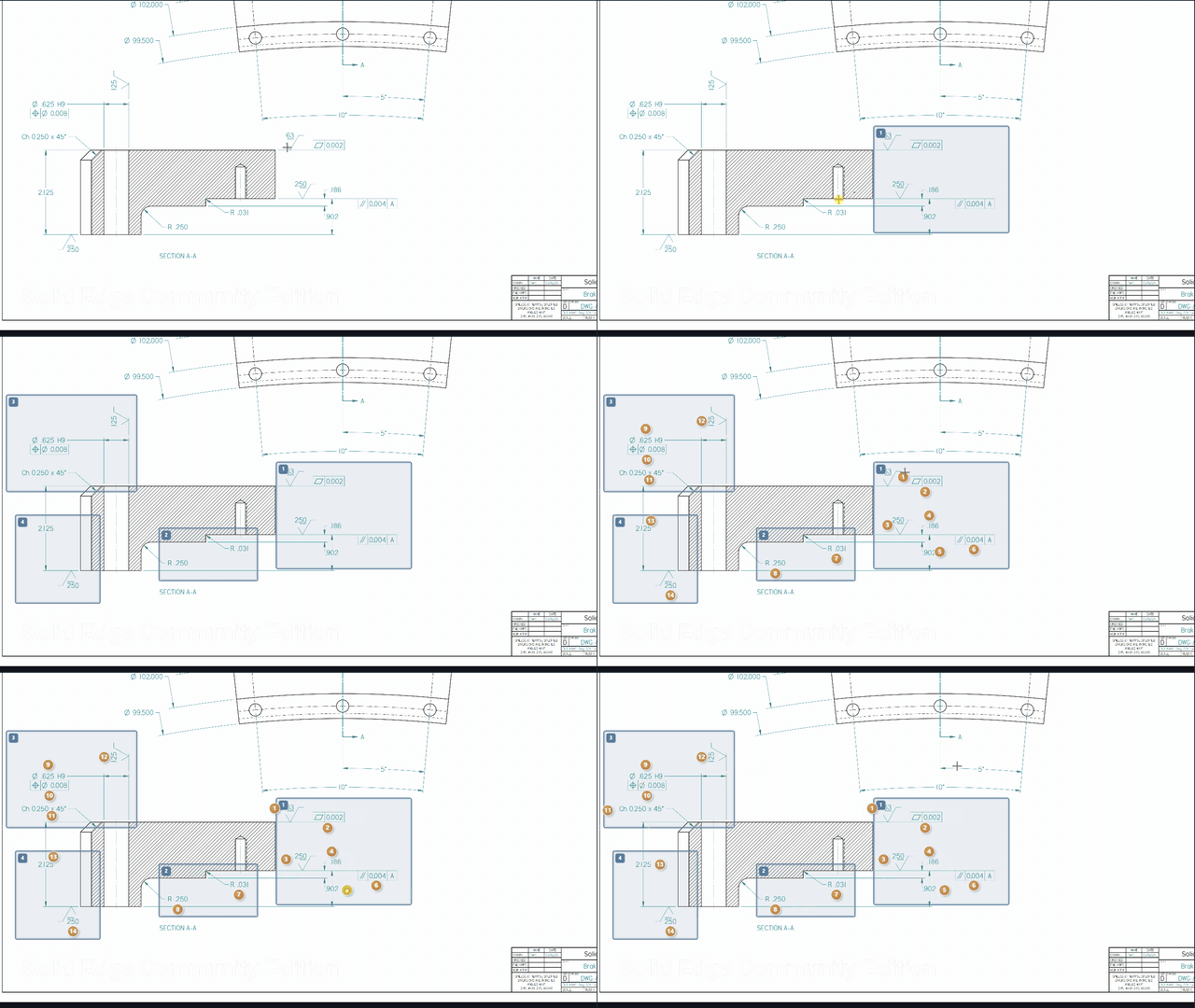
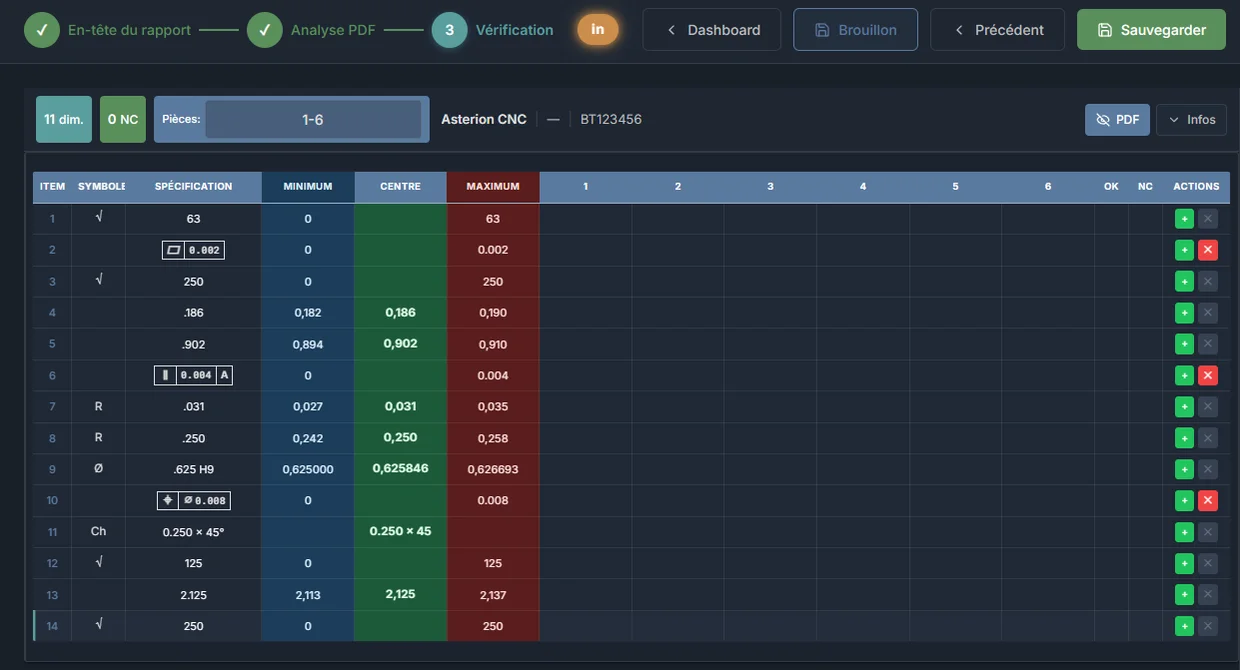
Frame a view. Every dimension in it is ballooned at once.
Draw a frame around five, twelve or thirty dimensions. OCR reads them all, the balloons place themselves next to each dimension, on the blank of the drawing and at the size of its text, and each dimension becomes a line in the report, with its min and max already calculated. A 300-dimension drawing takes a few dozen frames, not 300 clicks.
- 96.8%of dimensions extracted automatically
- 93.5%correct with no edits at all
- 21,550+dimensions read in production
Real KPIs, September 2026
What the OCR recognises on a machining drawing:
- GD&T ASME Y14.5
- datums A B C
- 3/8-16 UNC
- chamfers
- counterbores
- depths
- MAX / MIN
- fractions
- feet-inches
- TYP · REF left out
The title block's general tolerances apply to dimensions that have none: ISO 2768 or ASME, angles included. The ones you use often are saved for the shop. Drawing in inches, customer in millimetres: the conversion follows.
What if the OCR gets it wrong?
It happens: a 3 read as a 5, a note cut off. On our production reports, 93.5% of dimensions are correct with no edits (September 2026): about one in fifteen needs a correction. You fix it in the line, and the balloon follows. Nothing to drag around: balloons land where you would have put them. That's why nobody sends a report without reading it.
Your drawings are confidential?
Only the zone you frame goes to automatic reading; the title block and the other views don't. The drawing stays in your space, hosted in Montréal.
Gonenumbered stamps in Acrobat · the Excel grid built line by line · the calculator for min and max
The machinist measures at the machine, and knows right away if the part is good.
On the shop PC, a tablet or the shared station, they open their job's report and type in their measurements — or their Bluetooth gauge sends them into the cell. An out-of-tolerance value turns red while the part is still in the machine, not three days later at the office.
Your people aren't computer people?
There is one thing to learn: type a number in a cell. On the shared station, everyone picks their name; their initials follow their measurements.
First article, then the run?
First off, then production follow-up, or lot sampling. Several machinists can fill in the same report.
What does it cost to connect them all?
Nothing more. Report is priced per shop, not per user: machinists are not another line on the invoice.
| Item | Minimum | Nominal | Maximum | 1 |
|---|---|---|---|---|
| 1 | 108.671 | 108.750 | 108.829 | 108.750 |
| 3 | 105.246 | 105.248 | 105.250 | 105.248 |
| 5 | 99.421 | 99.500 | 99.579 | 99.410-0.011 |
| 8 | 5/16-18 UNC | GO | ||
| 12 | 0.625 | 0.633 | 0.640 | 0.633 |
JT and SL on the same order · initials and time kept on every measurement
Gonethe oil-stained sheet · retyping at the end of the day · “where’s the report for 4471?”
Before it ships, someone reads it and signs.
You read what was read and measured, and you approve. Only a manager can do it, and the server checks that, not the screen. The day an auditor asks who measured dimension 14 on part 7, and when, the answer is printed on the report.
Need to correct after approval?
It happens. The report can be corrected, and every change is written to a log that can't be rewritten.
A signature on the report?
Signature block at the bottom of the page, signer separate from the inspector, date locked at approval.
The report your customer receives.
One inspection PDF for the whole order: the ballooned drawings, the report for each part, out-of-tolerance values in red with their deviation from min or max, your notes on the line (“See NCR 123456”), the drawing notes checked off, your logo, the signature. On Chrome or Edge, it files itself in the right folder on your network.
Your customer requires their own Excel format?
Report fills in their template, on top of the PDF.
Your customer wants millimetres?
The ballooned drawing and the report come out in the unit they ask for.
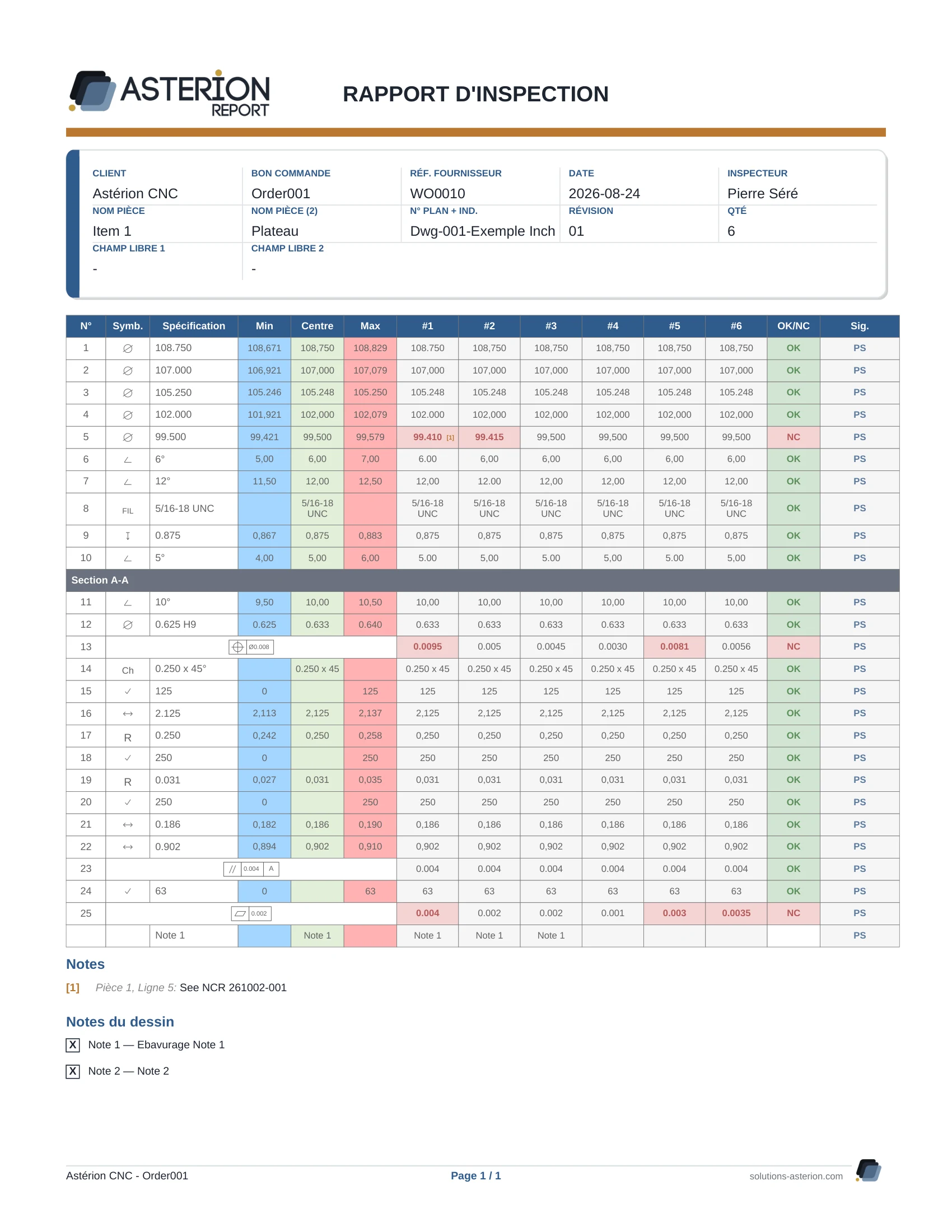
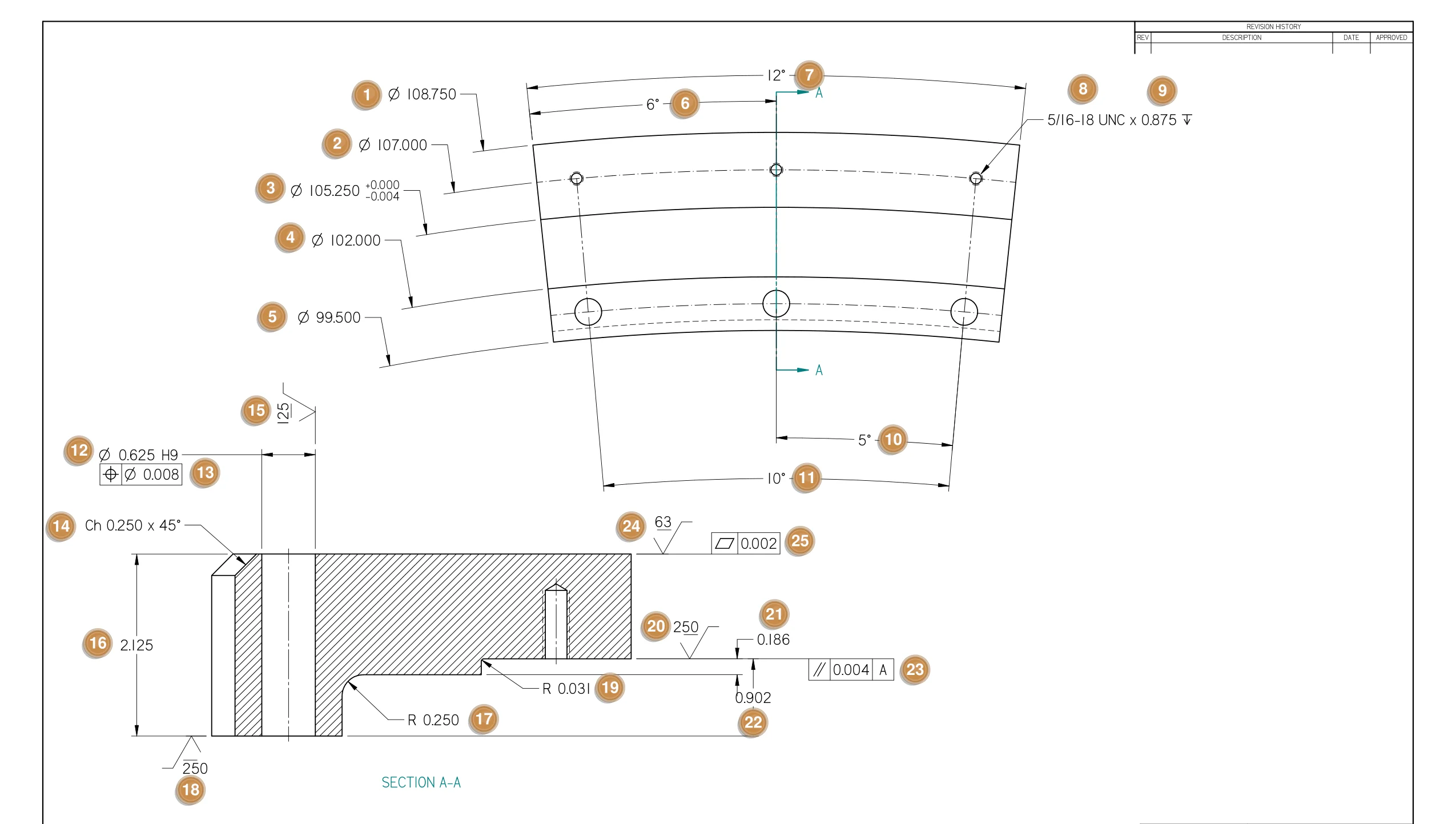
Generated by Report on test parts, exactly as a customer receives it, nonconformance included. This is the dimensional inspection of the order. Your material certs, treatments and deviations stay in your own files.
Gonethe clean-up · PDFs stitched together by hand · the customer calling for the report before accepting the pallet
Your report, your way.
Every customer has its own requirements. Report doesn't force its form on you: it adapts to your shop, and each report to the customer who will receive it.
For your shop · once, in Settings
- Your logo and colours on the PDF, and the style of the balloons on the drawing.
- Your words: every header field can be renamed. “Customer” becomes “Prime contractor”, “Free field 1” becomes “Plant”.
- What the PDF shows: initials on every line, signature block, temperatures, deviation of out-of-tolerance dimensions, parts per page.
- What the OCR keeps or drops: TYP dimensions, quantities, REF, dimensions in parentheses.
- Filing: the approved PDF files itself in the customer, work order or purchase order folder.
For each customer · when the report is created
- Their Excel template, filled in automatically.
- Their general tolerances, saved under their name and recalled in one click.
- Their sampling: fixed quantity, % of the lot or N parts per lot, printed in the header.
- Their units: inches or millimetres.
- First off, then production follow-up, when they require it.
The first Monday.
Software the shop doesn't use is worth nothing. Report goes in one job at a time, without stopping the floor.
- Start small.One customer, one part. The rest of the shop carries on as before.
- I show you on your drawing.You do the next one. At the office, you learn to frame and to approve.
- The machinist learns one thing.Type a number in a cell. The cell tells them if it's good.
- What you already have comes in.Your Excel dimension lists import; your usual tolerances are saved once.
- You talk to the founder.In English or French. I know the floor: fourteen years in machine shops in Quebec.
- 60 days to decide.On your real drawings, no credit card.
- 1,600+reports generated in production
- 268reports in the last 30 days
- 6active shops, 4 of them in Quebec
- 27people building reports, not counting the machinists who fill them in
Machine shops, including hydroelectric work · figures as of October 12, 2026
Your drawings aren't yours alone.
A drawing often belongs to your customer, under a confidentiality agreement. Report is built for that.
Hosted in Montréal
Your reports, your drawings and the reading stay in Canada.
The zone, not the drawing
Only the zones you frame go to automatic reading.
You can leave
Everything can be exported as PDF, JSON and CSV, whenever you want.
Run the math with your own numbers.
On my own reports, building one by hand took about 45 minutes. Use your own numbers: your math is what counts, not mine.
Your volumes, your wages:
compute your real gain
Automate your inspection reports and free up hours every month.
3 quick questions to calculate your real savings.
No sign-up required
Bring one of your drawings.
I'll build the report in front of you, on your own part. Or try it on your own, 60 days, on your real drawings.
No credit card · One price per shop · Support in English and French
Not ready for a demo yet? Prepare the report for one of your drawings on your own.
When your customer or your auditor asks for more, gauge management and the quality system plug into the same data, with nothing to retype.
Technical questions: what Report doesn't do.
Better to know before you try.
- No AS9102 form today.
- No reading of CMM files.
- No simultaneous multi-user entry: you see other people's measurements when they save.